You have heard AI could help your business, but you are busy, and much of what you read seems written for companies with an IT department. What can AI realistically do for a firm your size, and where should you start?
The short answer: AI is good at routine work with words and patterns, such as drafting, sorting, answering common questions and summarising. It is not good at judgement, and it is sometimes confidently wrong. Start with one small, behind-the-scenes task, use AI that is already in tools you pay for, measure before and after, and get help only when you can name the problem but lack the time or skills to solve it.
Key takeaways
- AI is good at routine, repetitive work with clear inputs; it is weak at judgement.
- Start with AI already built into tools you pay for, before buying anything new.
- Try one task behind the scenes before anything customers see.
- Treat AI output like a capable trainee's first draft: check it.
- Measure the task before and after, and count the time spent checking.
What can AI realistically do for a business my size?
Most of what helps a small business is unglamorous. Think of a 12-person accountancy firm answering the same client emails every week, or a trades business typing supplier invoices into its accounts. Good first tasks look like this:
| AI is usually good at | AI is usually weak at |
|---|---|
| Drafting replies, letters and quotes from past approved examples | Decisions that need judgement, context or a relationship |
| Sorting an inbox or routing enquiries | Tasks where every case is different |
| Answering routine questions from your own information | Facts it has not been given: it can make them up |
| Summarising meetings, calls and long documents | Knowing when it is wrong |
| Matching invoices, orders and records | Fixing messy data: it repeats errors at speed |
AI can also help a small firm cover work it cannot staff, such as replying out of hours or producing a first draft when nobody has time, while people keep the human touch where it counts.
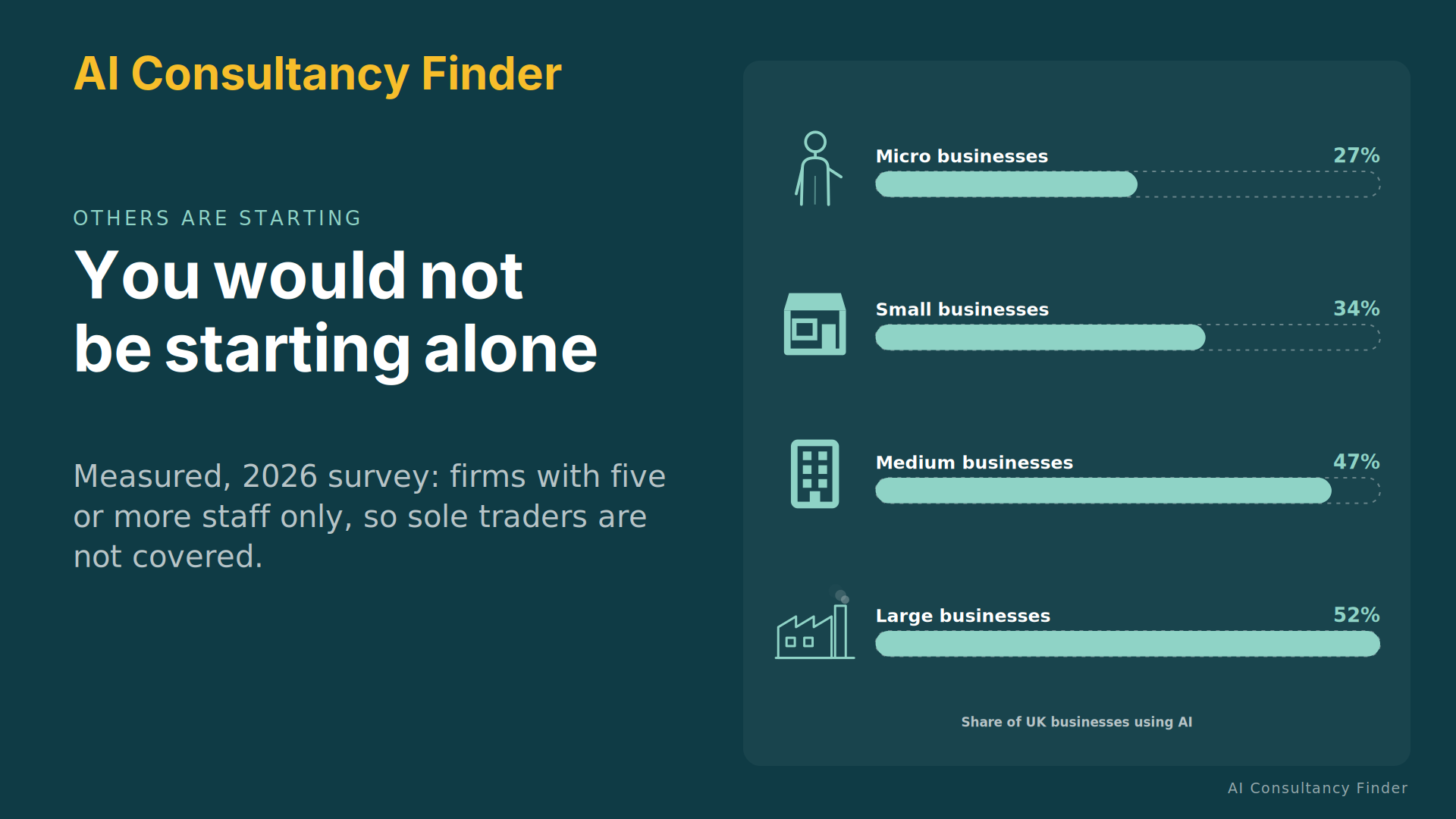
You would not be unusual in starting now. The UK Government's AI adoption survey found AI in use at 27% of micro businesses, 34% of small, 47% of medium and 52% of large businesses (p.21).1 The survey covers businesses with 5 or more staff only, so it says nothing about sole traders or firms of 1 to 4 people.
Where is a good first place to try it?
Work through three steps, in this order.
- Look at what you already pay for. Email, office, accounting and customer software increasingly include AI features. Switching one on costs little and teaches you a lot.
- Then consider a ready-made service built for a common task.
- Leave custom work until last, once you know what you need and what it is worth.
Pick a task that happens often, follows a pattern and happens behind the scenes, where a mistake is easy to spot before it reaches a customer. A customer-facing chatbot can feel like the obvious start, but it puts mistakes in front of the people you most want to impress. See start with the problem, not the tool for how to pick.
How do I measure whether it helped?
Before you change anything, note for a week or two how long the task takes, how often it goes wrong and who does it. That is your baseline. Then decide in advance what result would make you carry on and what would make you stop.
After a few weeks, compare. Count the time spent checking and correcting the AI's work, not just the time saved writing. If staff spend as long checking as they used to spend doing, the tool has added a step rather than removed one. Our guide on telling whether AI is paying off goes further.
What are the common mistakes and hidden costs?
- Trusting the output. AI writes fluently even when it is wrong. Check figures, quotes, names and claims before anything goes out.
- Ignoring checking time. It is real cost, and it can eat the saving.
- Feeding it bad data. Out-of-date price lists or muddled records produce confident, wrong answers. Tidy the information your first task needs; see getting your data ready.
- Paying for licences nobody uses. Check who actually uses each tool.
- Usage charges that grow. Some tools charge per use, so the bill can rise with volume.
- Trying too much at once. One task at a time lets you see what worked.
- Leaving the team out. People who do the work know the exceptions. See bringing your team with you.
What should I check before putting customer or staff information into an AI tool?
Be careful here. Free consumer versions of AI tools and paid business versions can come with very different terms about what happens to what you type in. Before you put customer or staff details into any AI tool, ask the supplier where the information goes, who can see it, whether it is used to train anything and whether it can be deleted. Then check your obligations with a data protection adviser. Until you have, keep personal details out and practise on information that would not matter if it leaked.
Does the size of my business change the advice?
This guide is for small businesses in the everyday sense: roughly up to 49 staff, including sole traders. The basics are the same at every size, but the first projects, the way you buy help and the free support differ. We have a guide for each size band:
- AI for micro businesses and sole traders (0 to 9 staff).
- AI for small businesses (10 to 49 staff).
- AI for medium-sized businesses (50 to 249 staff).
- AI for large organisations and public bodies (250 or more).
When should I do it myself, and when should I get help?
Do it yourself when the task is small, the tool is one you already have, and you can check the results. Plenty of businesses get real value this way.
Get help when you can name the problem but lack the time or skills to solve it, when the work needs connecting several systems, or when you are about to spend serious money and want a second opinion. A good adviser starts by asking what the problem costs you today, not by pitching a tool, and will tell you when AI is not the answer. Make knowledge transfer part of the deal, so you can run the result yourself afterwards.
- I have named one routine task and roughly what it costs me today.
- I have checked the AI already in the tools I pay for.
- I have decided who will check the output.
- I know what result would make me carry on, and what would make me stop.
- I am keeping customer and staff details out until I have taken advice.
Common questions
Will AI replace my staff?
For most small firms, AI takes over parts of jobs, not whole jobs. It tends to move people from routine work to checking, judgement and customers. Talk to your team early and honestly.
Do I need to be technical?
No. Your first steps need a clear problem, a willingness to check results and a little time. Technical help matters later, if at all.
I tried AI and it did not help. Should I give up?
Not necessarily. Often the task was wrong for AI, the data was messy or nobody measured. Write down what you tried and pick a narrower, more routine task next.
When you are ready to bring in help, start with how to choose an AI consultant and what an AI consultant costs.
Sources
-
Department for Business, Innovation, Science and Trade, "AI adoption survey 2026", 29 October 2026, https://www.gov.uk/government/publications/ai-adoption-survey-2026, accessed 2026-11-14. Telephone survey of 3,503 UK businesses with 5 or more employees, 7 January to 21 April 2026. ↩